



See it in action
Take a closer look at the design, features and real-world creative workflow.
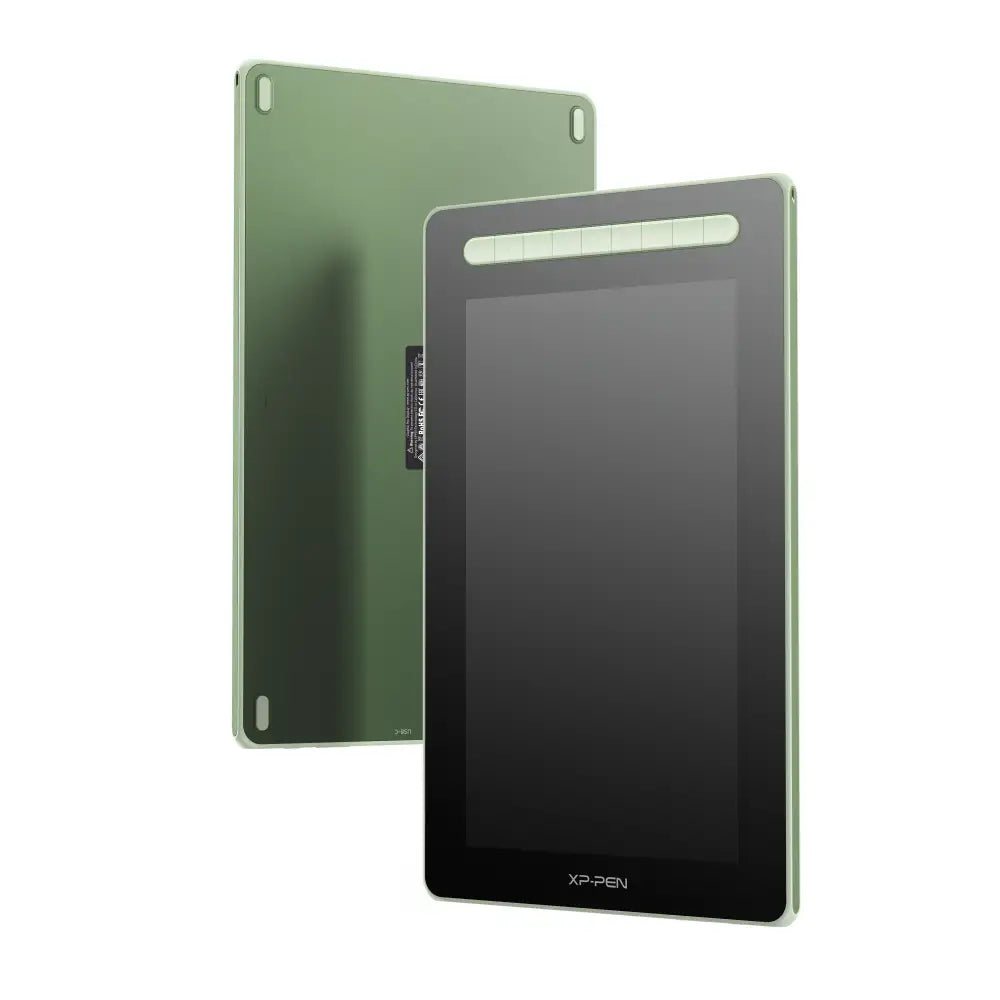
XPPen Artist 13 (2nd Gen) Drawing Display Graphics Tablet
Create Naturally. Draw Directly on Screen.
Bring your ideas to life with the XPPen Artist 13 (2nd Gen) Drawing Display Graphics Tablet, a portable and powerful 13.3-inch pen display designed for digital artists, illustrators, graphic designers, students, photographers and creators.
Combining a 1920 × 1080 Full HD fully laminated display, wide colour gamut, XPPen's advanced X3 Elite Smart Chip Stylus, 8,192 levels of pressure sensitivity, 60° tilt support and nine customisable shortcut keys, the Artist 13 (2nd Gen) gives you the accuracy and control needed for everything from your first digital sketch to detailed professional artwork.
Its slim, lightweight design makes it easy to add to a home studio, classroom or mobile creative setup, while flexible USB-C connectivity allows compatible computers and selected Android devices to connect with fewer cables.
Please Note: The XPPen Artist 13 (2nd Gen) is a drawing display and requires connection to a compatible computer or supported Android device to operate. It is not a standalone tablet and does not run drawing applications independently.
13.3-Inch Full HD Drawing Display
The Artist 13 (2nd Gen) gives you a comfortable 13.3-inch drawing surface, providing plenty of room for illustration and design while remaining compact enough to easily fit into most workspaces.
Its 1920 × 1080 Full HD resolution keeps artwork, interface elements and fine details crisp and clear, making it an excellent choice for users who want the natural experience of drawing directly on screen without needing a large desktop display.
The 16:9 workspace is well suited to popular creative applications and gives you enough room for your canvas, layers, brushes and other tools without making the tablet difficult to transport.
Display Highlights
-
13.3-inch display
-
1920 × 1080 Full HD resolution
-
293.76 × 165.24 mm active drawing area
-
IPS-ADS display technology
-
178° wide viewing angle
-
8-bit colour depth
-
220 cd/m² brightness
-
1000:1 contrast ratio
-
Fully laminated display
-
Anti-glare drawing surface
The official XPPen specification lists a 293.76 × 165.24 mm working area, 1920 × 1080 resolution, 1000:1 contrast ratio and 178° viewing angle.
X3 Elite Smart Chip Stylus
Fast, Stable and Precise
One of the biggest upgrades of XPPen's second-generation Artist series is the introduction of the X3 Smart Chip Stylus technology.
The included X3 Elite Stylus is designed to provide a more immediate and natural response when the pen touches the screen.
With an initial activation force as low as 3 grams, very light strokes can be recognised without needing to press firmly against the display.
The stylus also features a retraction distance of approximately 0.6 mm, helping reduce unwanted movement at the nib and creating a more stable, predictable pen feel.
XPPen specifically lists the X3 system's initial activation force at approximately 3 g and retraction distance at approximately 0.6 mm.
8,192 Levels of Pressure Sensitivity
The Artist 13 (2nd Gen) supports 8,192 levels of pressure sensitivity, allowing your digital brushes to react to subtle changes in how hard you press.
Apply light pressure for delicate lines, then press harder to create thicker or darker strokes depending on the brush and software you're using.
This provides significantly greater control when working with:
-
Line weight
-
Brush opacity
-
Shading
-
Sketching
-
Inking
-
Painting
-
Hair and fur
-
Calligraphy
-
Photo retouching
-
Digital sculpting
Pressure sensitivity helps make digital drawing feel more expressive and less like working with a traditional computer mouse.
Battery-Free EMR Technology
The X3 Elite stylus uses Electromagnetic Resonance (EMR) technology, meaning the pen doesn't require a battery or regular charging.
Simply pick it up and start drawing.
No charging cables.
No battery level to worry about.
No interrupted creative sessions because your stylus has gone flat.
60° Tilt Support
The X3 Elite Stylus supports up to 60 degrees of tilt detection.
When used with compatible brushes and creative software, tilting the stylus can change the behaviour of the digital brush in much the same way as tilting a traditional pencil or marker.
This is particularly useful for:
-
Pencil-style shading
-
Charcoal effects
-
Broad brush strokes
-
Natural-looking sketching
-
Digital painting
Together with the 8,192 levels of pressure sensitivity, tilt recognition allows for a much more expressive drawing experience.
Fully Laminated Display
Draw Where Your Pen Touches
The Artist 13 (2nd Gen) uses full lamination technology, reducing the physical gap between the LCD display and the drawing surface.
On conventional non-laminated pen displays, the separation between the protective glass and LCD can make the cursor appear slightly below the actual stylus nib.
By laminating the screen layers together, the Artist 13 (2nd Gen) significantly reduces this parallax effect.
The result is a more direct drawing experience where the cursor appears much closer to the tip of your stylus.
This can make a noticeable difference when working on:
-
Detailed line art
-
Small illustrations
-
Character design
-
Comics and manga
-
Photo masking
-
Fine selections
-
Handwriting
-
Technical drawings
XPPen confirms that the Artist 13 (2nd Gen) uses a fully laminated display specifically to minimise the visual separation between the pen nib and cursor.
Anti-Glare, Paper-Like Drawing Surface
Drawing directly onto highly reflective glass can feel unnatural.
The Artist 13 (2nd Gen) features an anti-glare surface with a subtle paper-like texture, providing gentle resistance underneath the pen nib.
This helps produce a more controlled drawing experience compared with writing on completely smooth glass.
The matte surface also helps reduce distracting reflections from nearby lights and windows, allowing you to stay focused on your artwork.
Drawing Surface Benefits
-
Reduced reflections
-
More natural pen resistance
-
Better stylus control
-
Comfortable sketching experience
-
Reduced glass-like slipperiness
Vibrant, Wide Colour Gamut
Great digital art deserves great colour.
The Artist 13 (2nd Gen) features a wide colour gamut designed to reproduce rich, vivid colours across illustrations, photographs, graphics and creative projects.
XPPen's current global specification lists typical colour gamut figures of:
-
130% sRGB
-
96% Adobe RGB
-
92% NTSC
This wide colour range makes the Artist 13 (2nd Gen) suitable for digital painting, illustration, graphic design and other creative workflows where rich colour reproduction matters.
Combined with its 8-bit colour depth, the display offers smooth colour transitions and plenty of tonal variation for creative work.
Nine Customisable Shortcut Keys
Work faster without constantly moving your hand back to the keyboard.
The Artist 13 (2nd Gen) features nine programmable shortcut keys located alongside the display.
Using XPPen's driver software, these keys can be configured to perform frequently used actions in your favourite creative applications.
You could, for example, assign shortcuts for:
-
Undo
-
Redo
-
Eraser
-
Brush tool
-
Increase brush size
-
Decrease brush size
-
Zoom
-
Hand tool
-
Selection
-
Save
-
Rotate canvas
-
Switch brushes
Because the buttons are customisable, you can configure the tablet around the way you work instead of changing your workflow to suit the tablet.
XPPen confirms nine user-definable shortcut keys are built into the Artist 13 (2nd Gen).
Switch Between Pen Display and Pen Tablet Modes
The Artist 13 (2nd Gen) isn't limited to being used as a screen.
Press and hold the power button and the display can be switched off while the tablet continues operating as a traditional screenless graphics tablet.
This gives you two ways to work:
Pen Display Mode
Draw directly onto the 13.3-inch Full HD screen and see your artwork beneath the stylus.
Pen Tablet Mode
Turn off the Artist 13's display and use its drawing surface to control the cursor on your main computer monitor.
This versatility can be useful for different applications and workflows, particularly if you already use a large colour-calibrated desktop monitor.
XPPen officially supports switching the Artist 13 (2nd Gen) from drawing-display operation into drawing-tablet mode.
Dual USB-C Ports
The Artist 13 (2nd Gen) features two USB-C ports, providing flexible connectivity depending on your device.
Full-Featured USB-C Connection
With a compatible computer that supports video output through USB-C, the Artist 13 (2nd Gen) can use a USB-C connection for a much cleaner desktop setup.
A compatible full-featured USB-C to USB-C cable is required and may be sold separately, depending on your package.
3-in-1 Cable Connection
For computers that don't support display output through USB-C, the included 3-in-1 cable provides traditional HDMI and USB connectivity.
This makes the Artist 13 (2nd Gen) compatible with a wide variety of desktop and laptop computers.
XPPen confirms both a full-featured USB-C port and 3-in-1 USB-C connection option are provided.
USB-C Compatibility Note: Not every USB-C port supports video output. Your computer's USB-C port must support the necessary DisplayPort video functionality for a single USB-C video connection.
Android Device Support
The Artist 13 (2nd Gen) can also connect to compatible Android devices that support the necessary USB-C video output standard.
Official compatibility requires Android devices supporting:
USB 3.1 + DisplayPort 1.2
This can provide a more portable drawing setup when paired with a suitable Android phone or tablet.
Android compatibility depends on the specific device. Having a USB-C connector alone does not guarantee display-output support.
Compact and Portable Design
One of the Artist 13 (2nd Gen)'s biggest advantages is its portability.
With overall dimensions of approximately:
378 × 225 × 11.99 mm
the tablet is only around 12 mm thick, making it considerably easier to transport than larger professional drawing displays.
Its size makes it particularly attractive for:
-
Students
-
Travelling artists
-
Small desks
-
Home studios
-
Classroom environments
-
Hybrid working
-
Creators who move between locations
You still get a comfortable 13.3-inch drawing area without having to dedicate a huge amount of desk space to your pen display.
Perfect for Digital Art
The Artist 13 (2nd Gen) is a versatile creative tool suitable for a wide range of applications.
Digital Illustration
Sketch, ink, colour and paint directly on screen using pressure-sensitive brushes.
Graphic Design
Work more naturally with selections, paths, masks, illustrations and graphics.
Photo Editing
Precisely control masks, selections, dodging, burning and retouching using the pressure-sensitive stylus.
Comics and Manga
The combination of accurate pen positioning, Full HD display and pressure sensitivity makes it excellent for line art and inking.
Animation
Use the pen display for storyboarding, frame-by-frame drawing, character design and animation workflows.
3D Creation
The stylus can be used for sculpting, texturing and precision control in compatible 3D applications.
Online Teaching and Education
Write directly on presentations, demonstrate calculations, annotate documents and create visual teaching material.
Extensive Software Compatibility
The XPPen Artist 13 (2nd Gen) is compatible with many popular creative applications, including:
-
Adobe Photoshop
-
Adobe Illustrator
-
Clip Studio Paint
-
Krita
-
GIMP
-
MediBang Paint
-
Paint Tool SAI
-
CorelDRAW
-
FireAlpaca
-
Blender
-
And many other graphics and creative applications
XPPen specifically lists applications including Photoshop, Illustrator, SAI, CorelDRAW, GIMP, Krita, MediBang, FireAlpaca and Blender among supported creative software.
Operating System Compatibility
The Artist 13 (2nd Gen) supports a broad range of platforms.
Compatible Operating Systems
-
Windows 7 or later
-
macOS 10.10 or later
-
ChromeOS 88 or later
-
Linux
-
Supported Android devices with USB 3.1 / DisplayPort 1.2
Official compatibility information is provided by XPPen.
Technical Specifications
General
Product Name: XPPen Artist 13 Drawing Display (2nd Gen)
Product Type: Pen Display / Graphics Drawing Display
Model: CD130FH
Dimensions: 378 × 225 × 11.99 mm
Display
Screen Size: 13.3 inches
Display Resolution: 1920 × 1080 pixels
Resolution: Full HD
Active Area: 293.76 × 165.24 mm
Display Technology: IPS-ADS
Colour Depth: 8-bit
Brightness: 220 cd/m²
Contrast Ratio: 1000:1
Viewing Angle: 178°
Full Lamination: Yes
Surface: Anti-glare, paper-like texture
Colour
Colour Gamut — Typical:
-
130% sRGB
-
96% Adobe RGB
-
92% NTSC
Stylus
Stylus: X3 Elite Smart Chip Stylus
Technology: Battery-Free EMR
Pressure Sensitivity: 8,192 levels
Initial Activation Force: As low as 3 g
Retraction Distance: Approximately 0.6 mm
Tilt Support: Up to 60°
Pen Resolution: 5080 LPI
Reading Rate: Up to 200 RPS
Reading Height: 10 mm
Accuracy: ±0.5 mm centre / ±1 mm corners
Shortcut Controls
Programmable Shortcut Keys: 9
Shortcut functions can be customised through XPPen's driver software.
Connectivity
Ports: 2 × USB-C
Connection Options:
-
Full-featured USB-C connection with compatible devices
-
3-in-1 cable connection using HDMI and USB
Power Input: DC 5V ⎓ 2A
Compatibility
Windows: Windows 7 or later
macOS: macOS 10.10 or later
ChromeOS: ChromeOS 88 or later
Linux: Supported
Android: Compatible USB 3.1 / DisplayPort 1.2 devices
XPPen's current specification sheet confirms the model number, dimensions, active area, display resolution, pressure sensitivity, pen resolution, accuracy, connectivity and operating-system requirements listed above.
What's in the Box?
The standard XPPen Artist 13 (2nd Gen) package includes:
-
1 × XPPen Artist 13 (2nd Gen) Pen Display
-
1 × X3 Elite Stylus
-
1 × 3-in-1 USB Cable
-
1 × USB Extension Cable
-
10 × Replacement Pen Nibs
-
1 × Nib Extractor
-
1 × Cleaning Cloth
-
1 × Black Drawing Glove
-
1 × Quick Guide
-
1 × Warranty Card
The above package contents are listed by XPPen for the Artist 13 (2nd Gen).
Package contents can vary slightly by region or production batch.
Who Is the XPPen Artist 13 (2nd Gen) For?
Beginner Digital Artists
If you're moving from traditional drawing to digital art, the Artist 13 (2nd Gen) gives you the familiar experience of drawing directly where your artwork appears.
Students
Its compact size, portable design and broad software compatibility make it a great option for creative students who may need to move between home, school, university or studio environments.
Illustrators
The X3 Elite stylus, 8,192 pressure levels and fully laminated display provide the control needed for detailed illustrations and line work.
Comic & Manga Artists
Precise cursor positioning and pressure-sensitive line control make it ideal for sketching, inking and colouring.
Graphic Designers
Work more naturally with Photoshop, Illustrator and other professional design software.
Photographers
A pressure-sensitive stylus gives you greater precision when masking, retouching, dodging and burning compared with a traditional mouse.
Animators
Use the Artist 13 (2nd Gen) for storyboarding, concept art, character development and frame-by-frame animation.
3D Artists
The pen can provide intuitive control for sculpting, texturing and other detailed 3D workflows.
Why Choose the XPPen Artist 13 (2nd Gen)?
The Artist 13 (2nd Gen) delivers an excellent balance between performance, portability and price.
You get:
-
13.3-inch Full HD drawing display
-
1920 × 1080 resolution
-
Fully laminated screen
-
X3 Elite Smart Chip Stylus
-
8,192 pressure levels
-
3 g initial activation force
-
60° tilt support
-
5080 LPI pen resolution
-
Up to 200 RPS reading rate
-
Wide 130% sRGB colour gamut
-
Anti-glare paper-like surface
-
Nine customisable shortcut keys
-
Dual USB-C ports
-
USB-C and 3-in-1 connectivity
-
Pen display and screenless tablet modes
-
Windows, macOS, ChromeOS, Linux and selected Android compatibility
-
Slim, portable design
Whether you're buying your first drawing display, upgrading from a screenless graphics tablet or looking for a compact second pen display, the XPPen Artist 13 (2nd Gen) packs an impressive amount of creative technology into a portable 13.3-inch format.
With its responsive X3 Elite stylus, fully laminated Full HD screen, vibrant colour reproduction and customisable shortcut controls, it's built to make digital drawing feel more natural, precise and enjoyable.